Angela Christopher
  • About
  • Photography

Reflections from Administrators Technology Conference

3/20/2012

0 Comments


Google Apps for Schools

I had the opportunity to present to a wonderful group of school administrators at the Administrators Technology Academy through Tennessee Educators Technology Association (TETA) in West TN.    We discussed one of my all time favorites: Google Apps!  Moving to a cloud based computer program can remove IT hassle, save money, allow for collaboration AND any time, anywhere access to all the things you need!  ...and it is FREE.
More resources are available on my Google Apps page. 

Digital Text Books

Picture
I also enjoyed a presentation by an Apple Representative who demonstrated iBooks - not just the use of digital text books but he also showed us how to create our own content.  The ability to integrate video, interactive graphics, checks for understanding, etc. is phenomenal.  The note taking capabilities, highlights, study cards and interactive dictionary are all benefits of digital books on the iPad.  Development also looks like a cinch - teachers can even upload content from Word documents. The major draw back of the iBook (besides that all the kids would need an iPad) is that the entire book would need to be "republished" and downloaded again for content updates.  

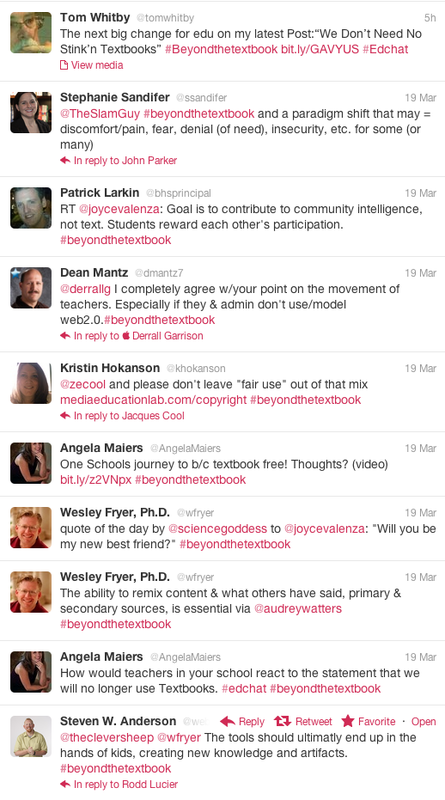
At the same time I was in the iBook demo I was reading an ongoing conversation on Twitter about digital textbooks.  A sample of the feed is pictured to the left.  Join the conversation by searching for #beyondthetextbook  


0 Comments

Blended Learning: The Best of Both Worlds

12/9/2011

0 Comments

 
Picture
I had the pleasure of presenting at the 2011 Mid-South Technology Conference with my friend and colleague Carmen Weaver. We we were thrilled to have the audience engage in thoughtful dialogue about their own experiences with blended learning platforms, online resources and flipping their F2F instruction - all very exciting stuff! Kathy Schrock and Dr. Carl Owen were the key note speakers and I can't wait to share everything I learned with other teachers.  I also talked with an amazing 12 year old young man who taught me about a comic strip creator he and his classmates used to demonstrate strategies to solve linear equations.  Stay tuned for more info on integrating technology for language arts!

Blended learning: The best of both worlds
View more presentations from Angela Christopher
0 Comments

Prezi + Screenr = Powerful Presentations (for free!)

9/29/2011

3 Comments

 
Teacher effectiveness is clearly under the microscope... 

I believe there is no better time than now to use our creative and tech skills to engage students in powerful learning.  We are teachers in a digital world and we have opportunities to share information with our students in entirely new ways - our students should have opportunities to do the same.  Just imagine the type of formative and summative assessments that could be created with the combination of interactive web 2.0 and 3.0 tools.

This week, I wrote a paper on an instructional design model  (Smith and Ragan) for a course I am taking in my doctoral program.  In addition to the paper, my peers and I were tasked with the challenge of creating a digital presentation.  Since design work is often non-linear in nature, a Prezi seemed the best tool to share my work online.  The Prezi captured the nature of my paper but lacked a little something... so I used Screenr to narrate the presentation.  Although I detest the sound of my recorded voice, I believe the combination is an interesting one that affords me the opportunity to share content in a potentially powerful way.

In the art room, I am envisioning narrated tours of artwork, recorded critques, and more.  So... Let's get creative!

If you have any interest in instructional design, or just want to see the Prezi/Screenr combo in action please feel free to watch the videos below (just give this Southern girl a break on my less than radio quality voice)...

Click here to read my paper on the Smith & Ragan Instructional Design Model.

NOTE: I have included the Prezi without narration below.

Instructional Design: the Smith and Regan Model on Prezi

3 Comments

Non-linear Presentations

10/2/2010

0 Comments

 
Tweet
Picture
Kudos to the Martin Institute for Teaching Excellence.  I attended a wonderful fall conference there yesterday and lurked virtually at their Teach Meet today.  The Institute boasted keynotes by Wesley Fryer and Tom Barrett and hosted 36 terrific presenters. Mid-South teachers, get ready to have your socks knocked off!

Prezi was among the many Web 2.0 tools discussed yesterday.  The presenter who mentioned the tool said that it was NOT for the linear thinker.  I beg to differ, but then I tend to think with the other side of my brain :)  I've seen the presentation tool used by students and teachers but until today, I had never tried it.  Presentations can be downloaded, viewed on the Prezie site, and  embeded into your wiki or blog.  The designer can give viewers complete control to click where they like OR you can create a linear path (with flips and spins!) for the learner to follow.  Options for auto play or click to advance are also included.

I highly recommend watching the short tutorial videos before you begin designing your own Prezi.  While uploading photos and typing text is a breeze, there is a slight learning curve as you plan the presentation path.  I had to rework mine a few times until I was happy with the final product.  The results were worth a little extra time ...and now I know!

Here is my first attempt.

Graphic Design Scavanger Hunt on Prezi


0 Comments

Teaching Today

9/24/2010

0 Comments

 
Tweet

Teaching Today

Picture
Research tells us that engaging in meaningful experiences helps learning “stick.”  As educators, how do we provide technology rich, creative, collaborative, problem solving opportunities for our students?  We are already experts in our content areas and we must add NETS to our ever-growing list of standards and teaching responsibilities.  No worries, it is easier than you think!   Let’s take a quick look at how the TPACK framework will help us understand our role as teachers in a growing world of technology.  Then, learn how to use readily available tools and some of the Internet’s vast resources to create significant learning opportunities for your students.

Angela Christopher & Tiffany Kelley
Enhancing Education Through Technology Ed Tech Summit
Martin Institute Fall Conference, Teaching for Tomorrow

Teaching Today
View more presentations from achristopher.

TPACK - a framework for thinking about how we teach with technology.

Technology Standards - know what is expected of you and your students
Tennessee Technology Standards
National Education Technology Standards

Web 2.0 - Classroom Tools

Remember to start SMALL!  - let your students be the experts! 

Collaborate:
Wikis are collaborative web pages created by multiple users.  Students and teachers can use the tool to write and edit information, and add images, video and audio.  Since a wiki can be edited by a group, the content can continuously change and improve. 
Try: Wetpaint or Wikispaces

Blogs- write, react, and share in a mulitmedia format
Try: edublogs, blogmeister, weebly

Social Networks: organize around your content and interests, join professional learning communities.  Check out Ning

Bookmarking - Save all of your favorite Internet resources and access them from anywhere.  Diigo and Delicious

Nike+ - record physical exercise, map routes and challenge your peers!

Digital Stories:
Share your message with video, text, graphics and audio.  Collaborate with classmates to present your new knowledge! Digital stories beat out traditional poster presentations any day!
Check out: VoiceThread 
Annimoto - automatically produces videos from your photos, video clips and music. Fast, free and easy.
50+  Web 2.0 ways to tell a story

Present:
Presentation tools allow users to share their knowledge with others.  Some tools also provide collaboration features!
These great tools:
Prezi - non-linear presetations, zoom in and out across text, graphics and video.
Google Docs - collaborative office suite for word processing, spreadsheets, powerpoints and more!
Voki- motivate students to participate, create

Mapping:
Google Earth - tour the earth, moon and sky in 3-D satellite imagery.  Mark places of interest, link resources and tours to share with others.  Click on "learn" to view a tutorial. Visit existing tours in the google earth gallery
Feel free to download my Memphis example & share with your class!  Add your city to it and share with us!  Download Memphis Landmarks kmz file, save it to your computer, open Google Earth, click file, click open, find the kmz file, click open then drag the file from temporary places to "my places" .

Mapwing- build, share, and explore virtual tours. Use digital photos to create virtual tours that include interactive maps, images, and comments.

Poll Everywhere - instant feedback
Wordle - create beautiful word clouds!

0 Comments

Use of Multimedia in Higher Education

4/12/2010

0 Comments


Long overdue...

Until I enrolled in my doctoral program, projects in college consisted primarily of writing papers and group presentations.  Now days, I am fortunate to have professors who encourage me to submit work in a variety of multimedia formats. Often, I am given project goals, criteria, lists of digital/web tools to choose from (or add to) and a due date.  That is it folks; little instruction on tool use... just the freedom to explore, experiment and encouragement to try something new.

Multimedia so much more than a paper!

If you want students to use their critical thinking skills give them choices!  Creating a blog, video, animation, etc. requires organizing, planning, synthesizing, applying information, creative thinking and risk taking. 

3 Examples

#1  - Wiki
Teaching and Learning with Web 2.0:
TPACK, Images in Education
My Matisse
  • Collaboration
  • Engagement
  • On going
  • More than just text!
#2 - Blog and digital portfolio
AestheTECH!
  • Reflection
  • Synthesis
  • Can be more than text alone!
  • Feedback from peers and professors
#3 - Cartoons and animation
Toondoo.com
  • Creative & fun way to share information
  • Synthesis
  • Production
  • Embed in wiki, blog or website

0 Comments

    Angela V. Christopher

    Artist, Mother, Teacher, Geek

    RSS Feed

    Check out my other sites: 

    Pinhole Photography
    theArtRoom

    Categories

    All
    Animation
    Apps
    Art Ed
    Creativity
    Dgbl
    Idt
    Information Literacy
    Internet Safety
    Mobile
    Parenting
    Photography
    Presentations
    Social Media
    Teaching
    Thoughts
    Virtual Field Trips
    Web20
    Wiki


Powered by Create your own unique website with customizable templates.